> For the complete documentation index, see [llms.txt](https://docs.hackle.io/llms.txt). Markdown versions of documentation pages are available by appending `.md` to page URLs; this page is available as [Markdown](https://docs.hackle.io/en/getting-started/terms.md).
# Key Terms
This document explains the key terms frequently used in Hackle.
{% hint style="info" %}
The terms on this page are used throughout the Hackle Dashboard and this entire guide.
{% endhint %}
| Category | Terms |
| -------------- | ------------------------------------------------------------------------------------------------------------------------- |
| General | Dashboard, Workspace, Environment, User Identifier, SDK, SDK Key |
| A/B Test | Control/Treatment Group, Goal, Variation, Variation Distribution, Traffic Allocation, Override, Targeting, Experiment Key |
| Data Analytics | Segment Criteria, Segment Items, Property, Session |
| Feature Flag | Feature Key, User Targeting, Individual Targeting |
| Funnel/Event | User Funnel, Event, Event Key |
### Dashboard
The space provided for Hackle platform users, offering a single Workspace.
### Workspace
The shared working space used by a company (or team) on the Hackle platform. Within a Workspace, you create and manage A/B Tests, funnels, and events. A/B Tests, funnels, and events are shared within the same Workspace.
Typically, one company uses one Workspace. However, it can also be used per team or per service as needed.
### Environment
Each Workspace supports multiple Environments. For example, the Production Environment for serving actual customers, and the Development Environment for development and QA purposes.
The Hackle Workspace currently provides two environments — the Production Environment and the Development Environment. The currently selected environment is displayed in blue.
### User Identifier
A value used to identify individual users, which must be a unique value with no duplicates.
{% hint style="info" %}
For more details, refer to the [User Identifier](/en/getting-started/user-identifier.md) documentation.
{% endhint %}
### SDK (Software Development Kit)
A development toolkit provided so developers can easily integrate with the Hackle platform. You can choose and integrate the SDK that matches your development language.
### SDK Key
A key used to identify the Environment when integrating an SDK.
***
## A/B Test (Experiment)
An experiment that compares newly released features, screens, or algorithms against the current ones to determine which performs better. The terms "Experiment" and "A/B Test" are used interchangeably.
### Control Group, Treatment Group
**Control Group**
The Control Group represents the current feature, screen, or algorithm being served to users. In an A/B Test, it is typically referred to as Variation Group A.
**Treatment Group**
The Treatment Group represents a feature, screen, or algorithm that users have not seen before — it is the new or changed version. In an A/B Test, it is typically referred to as Variation Groups B, C, D, etc. (all groups other than Group A).
### Goal
A Goal is the Metric used to measure whether the Treatment Group (Groups B, C, D, ...) achieves better results than the Control Group (Group A). In other words, you set a Goal to measure the performance of an A/B Test. You can freely create one or more Goals per A/B Test.
Example: Goals for an A/B Test on changing the Buy button color
If a company is considering changing the color of a "Buy" button and wants to verify the effect through an A/B Test, the Goals could be:
* Number of "Buy" button clicks
* Purchase conversion rate
### Variation (Test Group)
Refers to the Control Group and Treatment Groups — collectively shortened to **Groups**. An A/B Test has one Control Group (Group A) and one or more Treatment Groups (Group B, C, D, ...). Each Variation contains the feature, screen, or algorithm being compared in the A/B Test.
Example: Variation setup
* A/B Test (Buy button color change)
* Group A: Original color (blue)
* Group B: Changed color (red)
* Group C: Changed color (green)
* A/B Test (Search algorithm change)
* Group A: Original algorithm
* Group B: Changed algorithm
In Hackle A/B Tests, up to 10 Variations can be created (1 Control Group + 9 Treatment Groups).
### Variation Distribution
Users selected for an A/B Test are assigned to a random Variation.
As long as the A/B Test conditions do not change, a user is always assigned to the same Variation. For example, in an A/B Test experimenting with the color of a "Buy" button, if a user named John Doe is assigned to Group B, John Doe will continue to belong to Group B.
Which Variation a user is assigned to is determined through a distribution process.
{% hint style="info" %}
For details on the Variation Distribution principle, refer to the [Variation Distribution Principle](/en/ab-test/group-distribution/ab-bucketing.md) document.
{% endhint %}
### Traffic Allocation
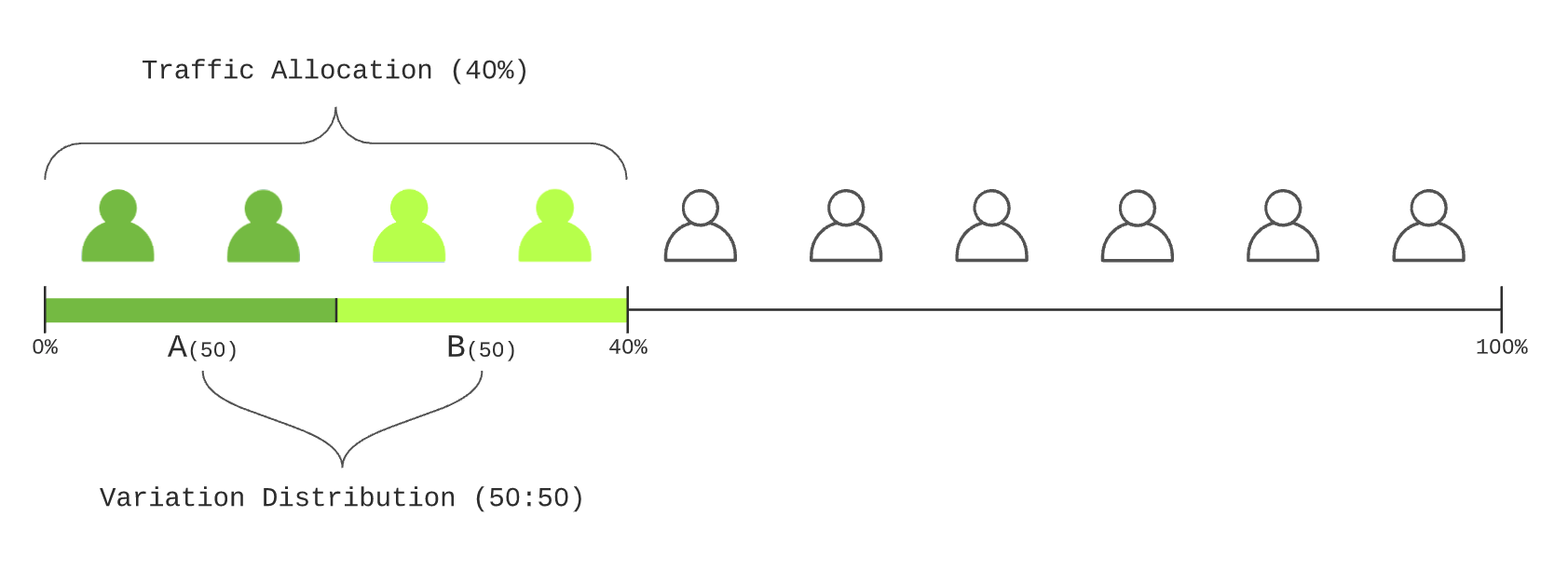
The percentage of total users who will participate in an A/B Test.
For example, if you set the Traffic Allocation to 40%, only 40% of total users will be included in the A/B Test, and the remaining 60% will not. The A/B Test Goals are calculated using only the data from the 40% of users allocated to the test.

{% hint style="warning" %}
**Traffic Allocation and Variation Distribution are different concepts.**
In the example above, with Traffic Allocation set to 40%, those 40% of users are then distributed among the Variations according to the Variation Distribution ratios.
 {% endhint %}
### Override
A feature that force-assigns a specific user to a specific Variation using their user identifier value. Users registered as Override targets are assigned to the designated Variation regardless of Targeting, Traffic Allocation, or Variation Distribution ratios.
This is used to verify behavior in a specific Variation for development testing, QA, etc.
### Targeting
A feature that limits A/B Test participation to users with specific properties. For example, you can configure the A/B Test to include only Android users among mobile operating system users. Note that users registered as Override targets cannot be Targeting targets.
### Experiment Key
A key used to identify each individual A/B Test. The Experiment Key is automatically issued when an A/B Test is created.
The Experiment Key is unique within a Workspace and is used during the Variation Distribution process.
***
## Data Segment Analytics
When user objects are sent to Hackle with properties included, you can perform more detailed analysis based on those properties. For example, if a property called 'membership tier' is sent, users can be segmented by membership tier for analysis.
### Segment Criteria
The target of the detailed analysis — it can be thought of as a category or range of items with the same characteristics. For example, "analyze by OS used by the user" means the Segment Criteria is OS.
### Segment Items
The items selected for analysis from among the possible values of the Segment Criteria. For example, if the Segment Criteria is OS, the Segment Items could include Android, iOS, Windows, MacOS, etc.
### Property
A method of expressing a user's characteristics using a Property Key and a Property Value. For example, to express operating system as a property, the Property Key could be `os`, and the Property Values could include Android, iOS, Windows, MacOS, etc.
### Session
A Session refers to the set of interactions generated by a user on a web or mobile app within a defined time window. A single session can include various events such as page visits, button clicks, and product purchases.
The session duration defined by Hackle is 30 minutes. That is, if 30 minutes have passed since the most recent event, that session is considered ended.
***
## Feature Flag
A Feature Flag is a software development technique that allows developers to remotely enable or disable features without deploying code. It is particularly useful for separating code deployment from feature releases.
### Feature Key
A key used to identify each individual Feature Flag. The Feature Key is automatically issued when a Feature Flag is created.
The Feature Key is unique within a Workspace and is used during the Feature Flag Decision step.
### User Targeting
A feature that applies a Feature Flag status value to users with specific properties. For example, you can apply a Feature Flag to all users using Android as their mobile operating system.
Note that users registered as Override (Individual Targeting) targets cannot be User Targeting targets. Additionally, users targeted by Individual Targeting or User Targeting are not subject to Traffic Allocation.
### Individual Targeting (Override)
A feature that force-assigns a specific user to be subject to a Feature Flag using their user identifier value. Users registered in Individual Targeting have the Feature Flag status value applied regardless of User Targeting or Traffic Allocation ratios.
This feature is useful when you only want to test internally.
***
## User Funnel (Funnel)
A User Funnel is an analysis tool for visually understanding the user journey within your service. You can use Funnel Analysis to see how many users entered a detail screen compared to the main screen, and how those numbers change on a daily, weekly, monthly, or quarterly basis.
***
## Event
An **Event** is an action performed by a user when using a website, mobile application, or system — or an occurrence that results from such an action. User actions include clicking a search button, entering a product page, completing a purchase, and similar behaviors. Other examples of events include order page load time, server API processing time, and mobile app crashes.
Hackle requires events for the following purposes:
* Calculating A/B Test Goals
* User Funnel Analysis
### Event Key
When creating an event, you must enter an Event Key. The Event Key is necessary for Hackle to identify events. Hackle uses the Event Key to collect and record events.
The Event Key is unique within a Workspace and is used as a parameter when sending user events after SDK integration.
---
# Agent Instructions
This documentation is published with GitBook. GitBook is the documentation platform designed so that both humans and AI agents can read, navigate, and reason over technical content effectively. Learn more at gitbook.com.
## Querying This Documentation
If you need additional information that is not directly available in this page, you can query the documentation dynamically by asking a question.
Perform an HTTP GET request on the current page URL with the `ask` query parameter, and the optional `goal` query parameter:
```
GET https://docs.hackle.io/en/getting-started/terms.md?ask=&goal=
```
`ask` is the immediate question: it should be specific, self-contained, and written in natural language.
`goal` is optional and describes the broader end goal you are ultimately trying to accomplish on behalf of the user. GitBook uses it to tailor the answer towards what is most useful for that goal.
The response will contain a direct answer to the question and relevant excerpts and sources from the documentation.
Use this mechanism when the answer is not explicitly present in the current page, you need clarification or additional context, or you want to retrieve related documentation sections.
{% endhint %}
### Override
A feature that force-assigns a specific user to a specific Variation using their user identifier value. Users registered as Override targets are assigned to the designated Variation regardless of Targeting, Traffic Allocation, or Variation Distribution ratios.
This is used to verify behavior in a specific Variation for development testing, QA, etc.
### Targeting
A feature that limits A/B Test participation to users with specific properties. For example, you can configure the A/B Test to include only Android users among mobile operating system users. Note that users registered as Override targets cannot be Targeting targets.
### Experiment Key
A key used to identify each individual A/B Test. The Experiment Key is automatically issued when an A/B Test is created.
The Experiment Key is unique within a Workspace and is used during the Variation Distribution process.
***
## Data Segment Analytics
When user objects are sent to Hackle with properties included, you can perform more detailed analysis based on those properties. For example, if a property called 'membership tier' is sent, users can be segmented by membership tier for analysis.
### Segment Criteria
The target of the detailed analysis — it can be thought of as a category or range of items with the same characteristics. For example, "analyze by OS used by the user" means the Segment Criteria is OS.
### Segment Items
The items selected for analysis from among the possible values of the Segment Criteria. For example, if the Segment Criteria is OS, the Segment Items could include Android, iOS, Windows, MacOS, etc.
### Property
A method of expressing a user's characteristics using a Property Key and a Property Value. For example, to express operating system as a property, the Property Key could be `os`, and the Property Values could include Android, iOS, Windows, MacOS, etc.
### Session
A Session refers to the set of interactions generated by a user on a web or mobile app within a defined time window. A single session can include various events such as page visits, button clicks, and product purchases.
The session duration defined by Hackle is 30 minutes. That is, if 30 minutes have passed since the most recent event, that session is considered ended.
***
## Feature Flag
A Feature Flag is a software development technique that allows developers to remotely enable or disable features without deploying code. It is particularly useful for separating code deployment from feature releases.
### Feature Key
A key used to identify each individual Feature Flag. The Feature Key is automatically issued when a Feature Flag is created.
The Feature Key is unique within a Workspace and is used during the Feature Flag Decision step.
### User Targeting
A feature that applies a Feature Flag status value to users with specific properties. For example, you can apply a Feature Flag to all users using Android as their mobile operating system.
Note that users registered as Override (Individual Targeting) targets cannot be User Targeting targets. Additionally, users targeted by Individual Targeting or User Targeting are not subject to Traffic Allocation.
### Individual Targeting (Override)
A feature that force-assigns a specific user to be subject to a Feature Flag using their user identifier value. Users registered in Individual Targeting have the Feature Flag status value applied regardless of User Targeting or Traffic Allocation ratios.
This feature is useful when you only want to test internally.
***
## User Funnel (Funnel)
A User Funnel is an analysis tool for visually understanding the user journey within your service. You can use Funnel Analysis to see how many users entered a detail screen compared to the main screen, and how those numbers change on a daily, weekly, monthly, or quarterly basis.
***
## Event
An **Event** is an action performed by a user when using a website, mobile application, or system — or an occurrence that results from such an action. User actions include clicking a search button, entering a product page, completing a purchase, and similar behaviors. Other examples of events include order page load time, server API processing time, and mobile app crashes.
Hackle requires events for the following purposes:
* Calculating A/B Test Goals
* User Funnel Analysis
### Event Key
When creating an event, you must enter an Event Key. The Event Key is necessary for Hackle to identify events. Hackle uses the Event Key to collect and record events.
The Event Key is unique within a Workspace and is used as a parameter when sending user events after SDK integration.
---
# Agent Instructions
This documentation is published with GitBook. GitBook is the documentation platform designed so that both humans and AI agents can read, navigate, and reason over technical content effectively. Learn more at gitbook.com.
## Querying This Documentation
If you need additional information that is not directly available in this page, you can query the documentation dynamically by asking a question.
Perform an HTTP GET request on the current page URL with the `ask` query parameter, and the optional `goal` query parameter:
```
GET https://docs.hackle.io/en/getting-started/terms.md?ask=&goal=
```
`ask` is the immediate question: it should be specific, self-contained, and written in natural language.
`goal` is optional and describes the broader end goal you are ultimately trying to accomplish on behalf of the user. GitBook uses it to tailor the answer towards what is most useful for that goal.
The response will contain a direct answer to the question and relevant excerpts and sources from the documentation.
Use this mechanism when the answer is not explicitly present in the current page, you need clarification or additional context, or you want to retrieve related documentation sections.